
Nate Ziller has been posting hand-drawn cartoons to YouTube since 2007. "My name is Nate, and I make cartoons," says the channel, @activeobjectx on YouTube. The oldest upload there is an animated music video Ziller made in the summer of 2006, "just after I graduated high school."
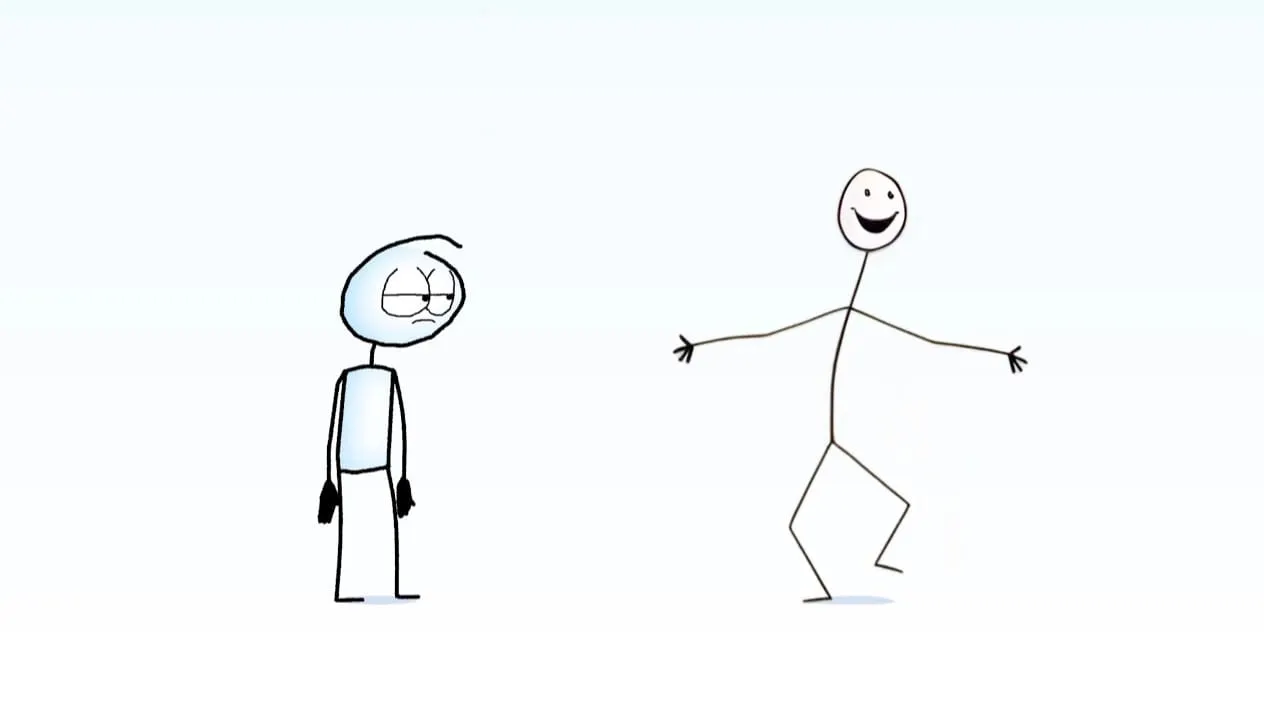
In April 2025 Ziller posted a 71-second short called AI Animation. A hand-drawn character talks to an AI version of himself. It had about 5.1 million views as of November 2026, and it turned into the AI series: a run of comedy shorts about AI, starring an "AI guy" Ziller makes partly with video generators.
People keep asking how much of the AI guy is really AI. Ziller has answered that in two long behind-the-scenes videos. It changes from shot to shot, and Ziller decides every one.
Nearly 20 years of cartoons first
Before the AI series, Ziller made a lot of other things by hand. There's Directionless, a comic strip Ziller posts on Tapas, and a set of short Directionless animations going back to 2011. There are music videos, comedy shorts, and songs. Ziller put out an EP called Pizza in 2024.
The Instagram bio at @thatnateguy on Instagram reads "Animator and musician." The Linktree page puts it this way: "I make the music and the cartoons."
Right before the series started, Ziller was making very short joke videos, 10 to 60 seconds each. "I was trying to make about one a month, and I didn't really have a goal outside of making what I thought was funny or interesting to me," Ziller says in the AI Knowledge behind-the-scenes video.
Why Ziller made an AI character
The first AI episode was one of those monthly jokes. Ziller explains where it came from in the same video. "At the time, I felt like there was a disconnect between what the marketing for AI said AI could do, as in replace everything, in particular animators and filmmakers, and what it was actually capable of doing."
So Ziller made AI the character, and wanted it to look different from how AI usually gets drawn. "We don't normally see it represented as something that is essentially human, which is a stick figure drawing."
The description under AI Animation lays out the split: "Left side of the screen is animated by hand. Right side of the screen used various AI programs, but was also heavily edited."
Viewers asked for more of the characters, so Ziller kept going. Since then Ziller has made AI Art, AI Doctor, AI Love, AI Hype, AI Knowledge and AI Jobs. Ziller says the goal is comedy over commentary. "I'm just trying to make them funny."
The cast is small:
- The hand-drawn guy. Ziller animates him and voices him.
- The AI guy. The stick figure. His voice is Ziller's voice run through a voice generator.
- Paper. A piece of paper with a face, added in AI Hype. He's voiced by an actor, Dan on Instagram, who is credited in the AI Hype description.
How Ziller makes the AI guy
Every AI shot starts from a drawing. Ziller drew the AI guy's standing pose in Clip Studio Paint, a drawing and animation app, and that image is the starting point Ziller feeds the video generators. Any time the AI guy stands still on screen, you're looking at that drawing with a line-wobble filter on it.
The whole video is storyboarded first, including roughly how the AI guy should react. Then Ziller tries a bunch of video generators with very simple prompts, like "hand-drawn stick figure talks passionately." Ziller doesn't name which generators in the AI Knowledge video.
Most of what comes back doesn't make it. "And majority of the outputs are bad. And they're bad in a way that's boring or unusable."
When a clip has one good moment, Ziller takes just that moment. For one line in AI Knowledge, Ziller liked the expression in an output that was otherwise unusable: the camera moved, there were particle effects, and an unwanted speech bubble. "So in After Effects, I cut out the face for a few frames and I overlaid it on that hand-drawn image of the AI guy."
From there it's editing work:
- Mixing clips. The AI guy often morphs between clips. His head can come from one model and his body from another.
- Time remapping. Ziller speeds up and slows down nearly every AI clip so the poses land on the right words.
- Puppet tool. Ziller pushes the AI guy's poses around in After Effects, mostly to smooth the jump between clips. In one shot Ziller made the AI guy point at the hand-drawn guy, which the original clip didn't do.
- The mouth. For most of AI Knowledge, the AI guy's mouth is a few hand-drawn shapes, lip-synced to the song.
Ziller also lets the AI guy change on purpose. In AI Knowledge, each time the AI guy is on screen he comes from a different model. "I feel like his character shouldn't stay consistent cuz that's what AI is like."
The moves Ziller draws by hand
Some moves the generators couldn't do. In AI Knowledge, Ziller wanted the AI guy to make small motions in time with the song. "And those are the ones where I hand animated them cuz I couldn't get the AI to be as subtle as I wanted it to be." Ziller drew four loops of the AI guy by hand for that video, and says AI Doctor has more hand animation in it than viewers probably think.
In the AI Jobs behind-the-scenes video, Ziller walks through shots that range from fully AI to fully hand-drawn. In the opening shot, the AI guy's walking legs are drawn by hand and his upper body is edited AI.
Ziller did animate that opening line completely by hand once, then dropped it because it looked too natural. For a run of AI guy poses, Ziller had AI make a sprite sheet and then drew over it, "because I thought if I made those initial poses myself, I might make it look too clean and I kind of want the imperfections of AI to be there."
A viewer asked if the AI guy will stop looking like bad AI once the tools get better. Ziller's answer: "I like when AI looks AI."
Reusing old clips, and using less AI
Ziller saves old AI clips and brings them back. "Something I also do is I frequently reuse old AI clips from previous videos."
By AI Jobs, that was most of it. "I did not generate very many new AI clips for this video. I mostly reused old clips." Ziller tried Seedance for this one and kept a single shot. The AI Jobs description says the same thing in fewer words: "Although I used a lot less AI in this video, the majority of the time he's hand-drawn/animated."
Ziller saw this coming at the end of the AI Knowledge video. As the AI guy became more of a character, the tools started holding the work back. "I'm finding the limitations of actually using AI to be too limiting. Ironic."
Everything else is by hand
The AI is only ever the AI guy. "I don't use AI for the backgrounds or really any of the pre-production stuff at all," Ziller says in the AI Jobs video. The hand-drawn guy and Paper are drawn in Clip Studio Paint, then put together in After Effects with camera moves and shading.
Ziller animates the hand-drawn guy in a set order: the body first, then the head, then eyes, arms and mouth. The idea is that the emotion should read from the body and head alone. Paper is a paper texture Ziller moves around with keyframes, with the face and arms animated on top.
Ziller writes the music too. AI Knowledge is built around a song Ziller started in 2023 and finished for the episode. The AI voice in it is two effects on Ziller's own voice, heavy auto-tune and a vocoder. The episode's description puts it simply: "The song doesn't use AI."
For the AI guy's speaking voice, Ziller still runs their own recordings through a voice generator, a local one now, to keep it matching the first episode. "I want his voice to be both distinctly AI but also have some human character to it," Ziller says.
Months per episode
Each one takes a long time. "These videos take me months to make," Ziller says in the AI Knowledge video. AI Jobs took about three months. Ziller writes from a document of loose ideas, records the voices, storyboards to the audio, then animates shot by shot. Patreon members get to watch each one early.
The Nate Ziller Patreon page also has more behind-the-scenes videos and sketches. At the end of the AI Jobs video, Ziller says another episode is already underway. "I am working on the next video and I have no idea how long it's going to take to make."
Tools Ziller credits
Clip Studio Paint · After Effects (puppet tool, time remapping) · Seedance (one shot in AI Jobs)
From the two behind-the-scenes videos. Ziller doesn't name the other video generators or the voice generator in use.