



Atlas, OpenAI’s new web browser, has only been out for a day, so I’ll start by saying this isn’t a review — just early impressions. It’s still at the beginning of its life cycle, but even at this stage, you can tell it represents something important.
I want to give OpenAI credit for this move. They’ve built so many tools for themselves internally — and it’s always exciting when they release one into the world to see how people actually use it. Atlas is one of those. And so far, I’m impressed.
It’s fast, first of all. And clean. Although based off Chrome, it doesn’t feel like other browsers that have been stuffed full of buttons, extensions, and clutter over the years. There’s no URL bar screaming at you. No visual noise. Just a big, open, minimalist canvas. It tickles my sensibilities for simplicity.
Right now, it’s Mac-only, which is fine by me. But the real star of the show — and what made me realize how different this thing really is — is Agent Mode.
The Epiphany Moment
Agent Mode feels like a glimpse of the next era of how we’ll use the web.
One of the first things I did was have it open my website, The Daring Creatives, and start working from there. I asked it to study my articles, understand my mission — building a community for artists, designers, musicians, and storytellers who use AI — and then help me find more people like that on Instagram.
And it did.
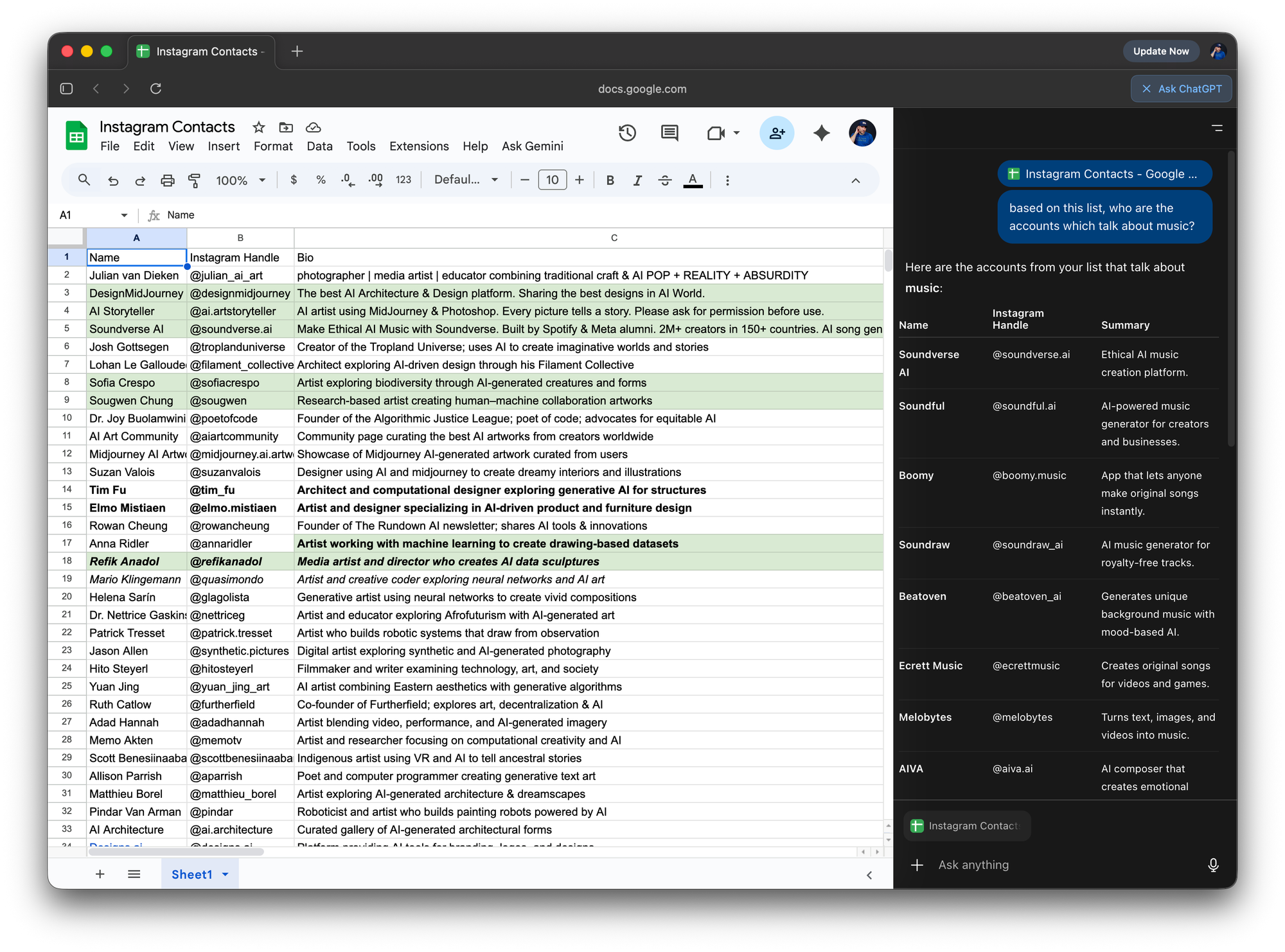
It searched the web, found lists of relevant creators, and built a spreadsheet in Google Sheets with names, handles, descriptions, and categories. The kind of list that would’ve taken me hours to compile manually. It was pulling from human-curated lists — blog posts, roundups, articles — not just random scraping. And that made it far more relevant than any attempt I’ve made using ChatGPT alone.
That moment was a little epiphany: this isn’t just “browsing” anymore. It’s orchestrating.
Seeing the Agent in Action
Then I took it further.
Since Atlas has access to your signed-in accounts, I logged into Instagram and asked it to follow those creators. Watching it work was surreal. You could literally see it learning the interface — finding the follow buttons, scrolling, checking if I was already following someone, then moving on.
It worked — but it also showed its limitations. The agent could only follow about five people at a time before the session ran out of compute. You could restart easily by saying “start a new session,” but still — you can imagine how much smoother it’ll feel once that’s extended.
Even with those small hiccups, it was impressive. I used it to help a client as well, having it study his artwork and generate a marketing plan while building a list of potential collectors. It was simultaneously writing in Google Docs and researching in Sheets — all from the same browser tab.
That’s when it hit me: this thing isn’t just a browser. It’s an interface for doing work.
What Comes Next
Atlas feels like the first serious step toward browsers becoming fully intelligent workspaces.
In theory, it could edit videos for me through Descript’s site, make songs on Udio, or post and schedule content across platforms — all through the web itself.
That’s a massive shift. It’s as fundamental as the leap from text-based ChatGPT to multimodal chat, or from standalone apps to the command line. Each mode changes how you think — and Atlas changes how you work.
Right now, it’s early. There are compute limits and rough edges. But it’s fast, minimal, and deeply capable.
If OpenAI continues refining it, this could be the beginning of a new default: not “searching the web,” but collaborating with it.
And I’ll say this much — I’m already considering making it my main browser.