// SYSTEM: DIGEST // LIVE
AI WORKFLOW
OPINION
TUTORIALS
ChatGPT
ChatGPT
William Smith
William
CONVERSATIONS WITH CODE

When to use Nano Banana Pro 2 vs. Nano Banana Pro

Here's something I didn't realize until I experimented with the new Nano Banana 2. It's not the best for all situations. Sometimes, Nano Banana Pro did a better job. I wanted to know why, so I dig a little deeper.
Article Details Transparency Protocol v3.0
William 70%
Original ideation, personal narrative regarding subscription consolidation, creative direction, and "Flow Hack" strategy.
AI 30%
Deep Research (Gemini 3.1 Pro), technical comparison data synthesis, structural drafting, and formatting.
Stack: Gemini 3.1 Pro, Voice Note, NotebookLM

Note to readers: Nano Banana 2 has been out for a few weeks now. In the world of AI, that’s practically a lifetime. So we're not breaking news with this post, but I wanted to sit with it, use it in my actual workflow, and see if the "magic" held up once the new-tool smell faded before commenting.

If you’re running a creative business in 2026, you’re likely playing a constant game of "Subscription Tetris." You’re looking at your monthly statements, seeing $20 here and $30 there, and wondering why you need three different AI models to do one job.

Lately, I’ve been eyeing the exit door for my ChatGPT Plus subscription, used right now only for image generation. Don't get me wrong, ChatGPT has been the backbone of the aesthetic you see here at The Daring Creatives. But my goal has always been a leaner, more integrated pipeline. Right now, I use Gemini for everything outside of image generation.

Then Google dropped the news about Nano Banana 2.

The Promise of Nano Banana 2

Google is framing Nano Banana 2 as a massive leap. It’s faster, it’s supposedly "smarter" at interpreting complex creative intent, and it’s integrated deeper into the Google ecosystem.

For companies of one (or a few) this is the type of integration you want. The idea of having your research, writing, and image generation all living inside one model is a dream.

But here's something I didn't realize until I experimented with the new Nano Banana 2. It's not the best for all situations. Sometimes, Nano Banana Pro did a better job. I wanted to know why, so I dig a little deeper.

Nano Banana 2 vs. Nano Banana Pro: Which is best for what application?

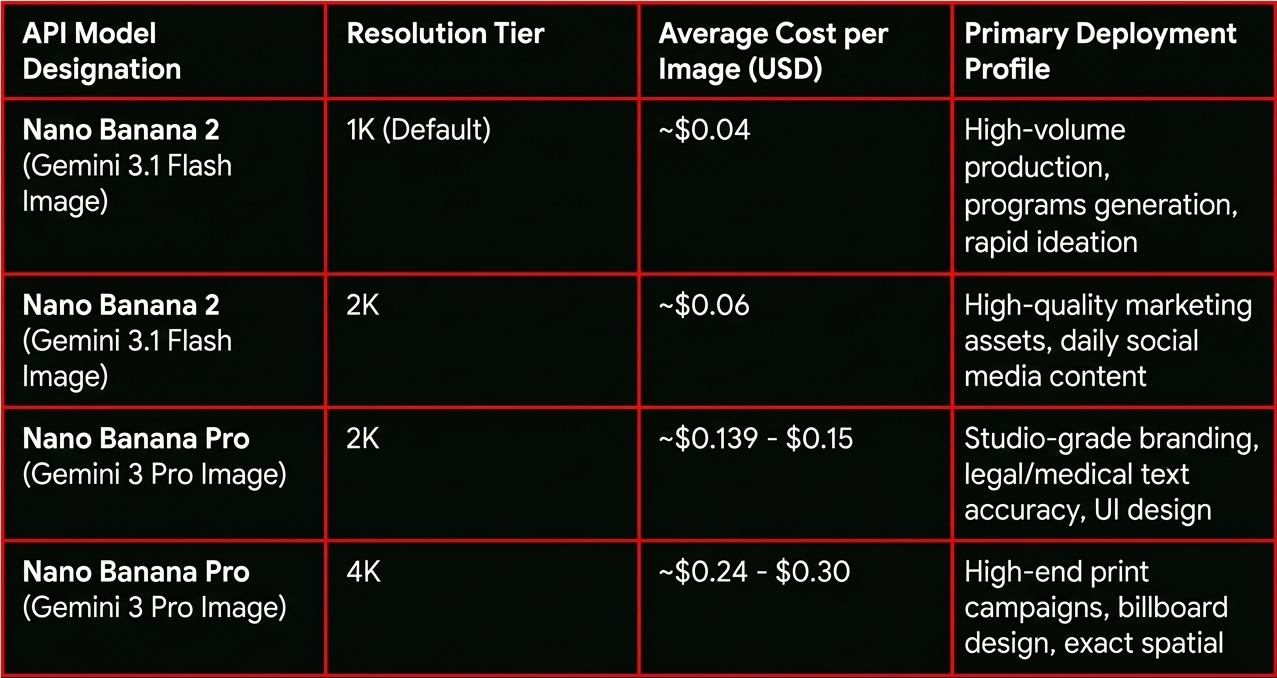
One thing the recent documentation makes clear is that Nano Banana 2 (Gemini 3.1 Flash Image) isn't just a "cheaper Pro." It’s an entirely different design philosophy.

  • Nano Banana Pro is your Studio-Grade Engine. If you need immaculate text rendering for packaging design, complex spatial logic for an architectural blueprint, or rigid adherence to a JSON-structured layout, the Pro model is the only answer. It "thinks" longer because it’s calculating the physics of the scene before it ever drops a pixel.
  • Nano Banana 2 is your Real-Time Assistant. It’s built for "Flash speed." It’s actually outperforming the Pro model in general aesthetic benchmarks—things like color saturation, texture, and pure visual impact. It’s the tool for rapid prototyping and creative brainstorming.

Using Nano Banana? Try Google Flow

While you can toggle between models in the standard Gemini app by using the "Regenerate with Pro" option in the three-dot menu, the best way I have found for selecting one or the other, while getting the most out of both models, is to use Google Flow.

Flow is like Google's dedicated AI image and video app. Because it is designed for filmmaking and narrative consistency, it treats image generation as an "ingredient" in a larger process. In Flow, I can rapidly cycle through Nano Banana 2 for storyboard frames and then selectively "up-res" or refine key assets using the Pro engine without losing context. It feels less like a chat bot and more like a dedicated creative suite that understands the difference between a rough sketch and a final render.

The Transparency Issue

Despite the leap in quality, here is my main gripe with both models: Where is the transparency?

I don't mean ethical transparency (though that matters). I mean literal, alpha-channel, .png transparency. For a professional creator, a flat JPEG with a white background is not so great.

To make Nano Banana 2 truly useful for my pipeline—to the point where I’d actually cut the cord with OpenAI—Google needs to nail the ability to generate transparent assets. I need to be able to pull a character, a mascot, or a UI element and drop it directly into my Ghost theme or a video project without spending ten minutes in Photoshop cleaning up "AI artifacts" around the edges.

The "Stylistic" Moat

Beyond the technical hurdle of transparency, there’s the issue of Soul.

I’ve built a very specific visual language for this brand. It’s a mix of gritty realism and high-contrast neon. Right now, ChatGPT understands that "vibe" in a way that ChatGPT's output that anchors The Daring Creatives. Nano Banana is close, but not there just yet.

I want to consolidate. I want to save that $20–$30 a month. But you can't put a price on the integrity of your visual voice.

The Path Forward

Nano Banana 2 looks like an incredible technical achievement. The speed alone makes it a contender. But "fast" doesn't matter if the output requires more human labor to make it "production-ready."

I’m going to continue using Nano Banana 2 (and Pro) heavily over the next few weeks. I want it to win. I want the lighter, faster, cheaper stack. But until I can get a transparent character that fits into my worlds without a struggle, I’ll be keeping my other subscriptions active.

Are you trying to consolidate your AI stack? Or are you happy playing "Subscription Tetris" to get the best results? Let’s talk about it on Threads.

← Back to Digest

When to use Nano Banana Pro 2 vs. Nano Banana Pro

Here's something I didn't realize until I experimented with the new Nano Banana 2. It's not the best for all situations. Sometimes, Nano Banana Pro did a better job. I wanted to know why, so I dig a little deeper.

When to use Nano Banana Pro 2 vs. Nano Banana Pro
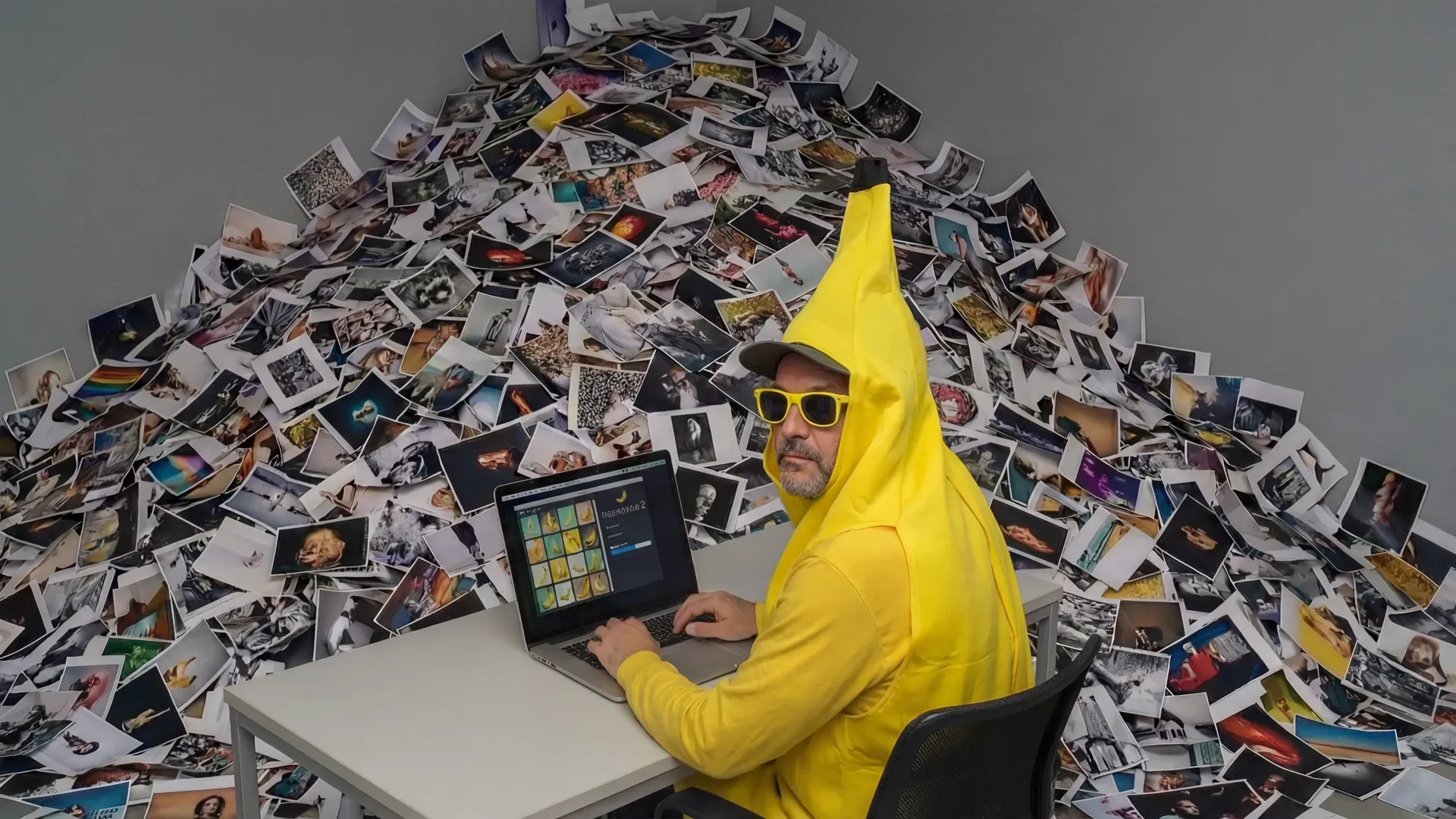
A man wearing yellow sunglasses and a full-body banana costume sits at a white desk, typing on a silver laptop that displays a grid of photos inside of Google Nano Banana. Behind him, a massive, chaotic mountain of printed photographs piles up in the corner and overflows onto the floor.
Article Details Transparency Protocol v3.0
William 70%
Original ideation, personal narrative regarding subscription consolidation, creative direction, and "Flow Hack" strategy.
AI 30%
Deep Research (Gemini 3.1 Pro), technical comparison data synthesis, structural drafting, and formatting.
Stack: Gemini 3.1 Pro, Voice Note, NotebookLM

Note to readers: Nano Banana 2 has been out for a few weeks now. In the world of AI, that’s practically a lifetime. So we're not breaking news with this post, but I wanted to sit with it, use it in my actual workflow, and see if the "magic" held up once the new-tool smell faded before commenting.

If you’re running a creative business in 2026, you’re likely playing a constant game of "Subscription Tetris." You’re looking at your monthly statements, seeing $20 here and $30 there, and wondering why you need three different AI models to do one job.

Lately, I’ve been eyeing the exit door for my ChatGPT Plus subscription, used right now only for image generation. Don't get me wrong, ChatGPT has been the backbone of the aesthetic you see here at The Daring Creatives. But my goal has always been a leaner, more integrated pipeline. Right now, I use Gemini for everything outside of image generation.

Then Google dropped the news about Nano Banana 2.

The Promise of Nano Banana 2

Google is framing Nano Banana 2 as a massive leap. It’s faster, it’s supposedly "smarter" at interpreting complex creative intent, and it’s integrated deeper into the Google ecosystem.

For companies of one (or a few) this is the type of integration you want. The idea of having your research, writing, and image generation all living inside one model is a dream.

But here's something I didn't realize until I experimented with the new Nano Banana 2. It's not the best for all situations. Sometimes, Nano Banana Pro did a better job. I wanted to know why, so I dig a little deeper.

Nano Banana 2 vs. Nano Banana Pro: Which is best for what application?

One thing the recent documentation makes clear is that Nano Banana 2 (Gemini 3.1 Flash Image) isn't just a "cheaper Pro." It’s an entirely different design philosophy.

  • Nano Banana Pro is your Studio-Grade Engine. If you need immaculate text rendering for packaging design, complex spatial logic for an architectural blueprint, or rigid adherence to a JSON-structured layout, the Pro model is the only answer. It "thinks" longer because it’s calculating the physics of the scene before it ever drops a pixel.
  • Nano Banana 2 is your Real-Time Assistant. It’s built for "Flash speed." It’s actually outperforming the Pro model in general aesthetic benchmarks—things like color saturation, texture, and pure visual impact. It’s the tool for rapid prototyping and creative brainstorming.

Using Nano Banana? Try Google Flow

While you can toggle between models in the standard Gemini app by using the "Regenerate with Pro" option in the three-dot menu, the best way I have found for selecting one or the other, while getting the most out of both models, is to use Google Flow.

Flow is like Google's dedicated AI image and video app. Because it is designed for filmmaking and narrative consistency, it treats image generation as an "ingredient" in a larger process. In Flow, I can rapidly cycle through Nano Banana 2 for storyboard frames and then selectively "up-res" or refine key assets using the Pro engine without losing context. It feels less like a chat bot and more like a dedicated creative suite that understands the difference between a rough sketch and a final render.

The Transparency Issue

Despite the leap in quality, here is my main gripe with both models: Where is the transparency?

I don't mean ethical transparency (though that matters). I mean literal, alpha-channel, .png transparency. For a professional creator, a flat JPEG with a white background is not so great.

To make Nano Banana 2 truly useful for my pipeline—to the point where I’d actually cut the cord with OpenAI—Google needs to nail the ability to generate transparent assets. I need to be able to pull a character, a mascot, or a UI element and drop it directly into my Ghost theme or a video project without spending ten minutes in Photoshop cleaning up "AI artifacts" around the edges.

The "Stylistic" Moat

Beyond the technical hurdle of transparency, there’s the issue of Soul.

I’ve built a very specific visual language for this brand. It’s a mix of gritty realism and high-contrast neon. Right now, ChatGPT understands that "vibe" in a way that ChatGPT's output that anchors The Daring Creatives. Nano Banana is close, but not there just yet.

I want to consolidate. I want to save that $20–$30 a month. But you can't put a price on the integrity of your visual voice.

The Path Forward

Nano Banana 2 looks like an incredible technical achievement. The speed alone makes it a contender. But "fast" doesn't matter if the output requires more human labor to make it "production-ready."

I’m going to continue using Nano Banana 2 (and Pro) heavily over the next few weeks. I want it to win. I want the lighter, faster, cheaper stack. But until I can get a transparent character that fits into my worlds without a struggle, I’ll be keeping my other subscriptions active.

Are you trying to consolidate your AI stack? Or are you happy playing "Subscription Tetris" to get the best results? Let’s talk about it on Threads.

// LEXICON_CITY_DISPATCH_REQ
// STATUS: CONNECTION_STABLE
// SOURCE: CENTRAL_DISPATCH_HQ

SHERMAN UPLINK: "I'm at HQ holding down Central Dispatch. Enter your query below to pull relevant data records and I'll see what data cards we've recovered!"