

Have you ever come back to something you care about after a busy week and realized you just… stopped? No progress, no output, nothing — while you were heads-down on whatever was on fire.
It's not that you forgot. You just ran out of bandwidth to keep track of everything at once.
Think of it like a project manager who never leaves the office. A good project manager doesn't write the copy, build the deck, or send the emails. They look across all the active work, notice what's slipping, and ask: what's short this week? What got skipped? What's piling up in one lane while another sits empty? Then they flag it — before it becomes a problem.
That's exactly what the orchestrator does. Not "how do I do more things faster" — but "how do I stop the same thing from falling off every time life gets busy."
If you've been following this series, you've already met the individual pieces — the pitch generator that decides what's worth building in the first place; the research and drafting agents that actually write the content; the optimizer that sharpens each draft before it moves; the scheduler that manages what goes out when; the distributor that handles delivery across channels; and the crew, the specialized agents that handle the AEGIS fiction and intel beats. Each one does a specific job. But something has to look at all of them at once and figure out what needs to happen next.
That's the orchestrator.
It's the last piece I'm writing about in this series, and honestly the hardest to explain — not because it's technically complicated, but because it doesn't do anything you can point at directly. It doesn't write. It doesn't publish. It just looks at the whole board.
(If you want the structural theory behind why that layer exists, Anthropic's guidance on building effective agents is worth a read.)
What gap analysis actually means in practice
Every couple of hours, the orchestrator runs a cycle. It pulls the current state of everything: what's published, what's sitting in drafts, what's queued in Buffer — including things I shipped manually, which most automation systems would just ignore and double-count against. It compares all of that against the week's targets per content type.
If articles are short by two, it flags that. If the Threads queue is thin, it flags that. If intel hasn't shipped in three days, it flags that.
Then it fills the gaps — but only with concepts that already passed the pitch gate. That part matters. An earlier version of this would have just invented topics to hit the numbers, and the output was exactly as bad as you'd expect.
Now the orchestrator draws from a pool of approved ideas. It's filling gaps I defined, not making up work on my behalf.
The distinction sounds small. In practice it's the difference between a pipeline that amplifies your editorial judgment and one that quietly replaces it with whatever keeps the schedule full.
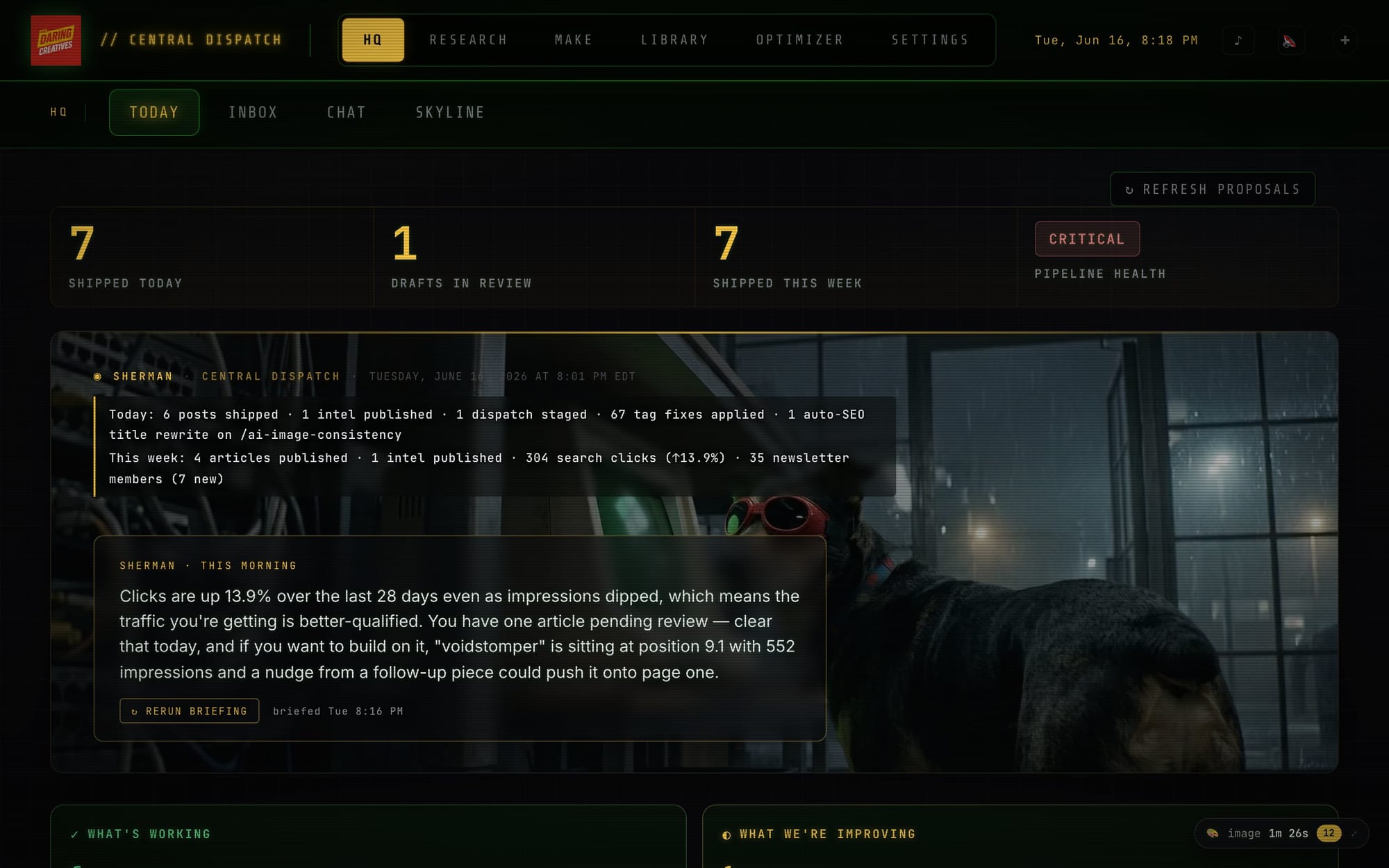
The HQ dashboard — gap analysis made visible: what shipped today, what's sitting in drafts, what's short this week, and where the pipeline needs attention. The orchestrator recomputes all of it every couple of hours.
The memory loop
This is the part I find most interesting, and also the part that took the longest to trust.
Every draft that comes out of the system gets an outcome tracked: approved clean, edited heavily, or deleted. From the edits, the system computes an edit ratio — 0.0 means I touched basically nothing, 1.0 means I rewrote the whole thing. When a topic or angle keeps landing at the high end of that ratio, the orchestrator generates a "learning" and injects it into the next prompt for that topic type. Something like: this angle gets heavily rewritten — study the previous edits before drafting.
The loop is: edit ratio → learning → adjusted prompt → (hopefully) better draft → lower edit ratio.
It doesn't always work on the first cycle. But over time, topics that kept coming out wrong have gotten noticeably better — not because I changed the instructions manually, but because the system surfaced the pattern from my own editing behavior and fed it back in.
A project manager analogy holds here too: imagine one who takes notes every time you push back on their work, then adjusts how they brief the team next time. That's the memory loop. It only works if you actually push back, though.
I want to be honest that this still requires me to actually edit, not just approve. The memory loop only learns from real feedback. If I rubber-stamp mediocre drafts to save time, the system learns that mediocre is fine and the whole thing degrades. The accountability runs both ways.
Why this piece comes last
I sequenced this deep dive last on purpose. The orchestrator is the most abstract layer, and it only makes sense once you understand what it's orchestrating. If you landed here first and the individual pieces are unfamiliar, the hub article that started this series is the right place to begin — it maps out the whole system in one place.
The six pieces before this one covered: the pitch generator that keeps the pipeline from inventing its own editorial agenda; the research and drafting agents and how they're prompted; the optimizer pass that sharpens each draft before it ships; the scheduler and how manual posts get reconciled back into the queue; the distributor and the transparency layer that tracks how much I actually changed each draft; and the crew that handles the AEGIS fiction beats. If you want the full picture of how the pipeline is actually structured, that breakdown covers the tools and architecture in one place.
The orchestrator sits above all of them. It doesn't replace any of them — it just watches the outputs and keeps the balance.
What this actually changes for a solo operator
I run this site by myself. I have other work. There are weeks where I'm heads-down on something else and the whole thing would just collapse without a system doing the gap-watching.
The orchestrator isn't solving a content problem. It's solving the same problem everyone has when they're trying to keep multiple things moving at once.
Think about it this way. You probably have things in your life that only get attention when you remember to look at them. The side project. The relationship you keep meaning to nurture. The skill you're trying to build. The habit that's been "starting Monday" for six weeks.
None of those things fail because you stopped caring. They fail because keeping track of everything at once is genuinely hard, and when something demands your full attention, the things that don't shout get dropped.
A project manager — a good one — would catch that before it became a miss. They'd have a system for it: a weekly check-in, a dashboard, a standing agenda item. The orchestrator is just that, automated. It checks against targets I set when I had a clear head, not in the middle of a crunch.
That logic applies whether you're managing a publishing schedule, a client roster, a creative practice, or anything that matters to you but doesn't demand attention loudly enough to survive a busy week.
What I built it for, specifically
For this site, the orchestrator watches four content lanes: long-form articles, Threads posts, intel dispatches, and the AEGIS fiction beats. Every couple of hours it checks what's published, what's queued, what's sitting in drafts — and it compares that against the week's targets.
When a lane is short, it flags it and pulls from the pool of approved ideas to fill the gap. When an article keeps coming out wrong, the memory loop surfaces that pattern and adjusts the next prompt. When the AEGIS story starts repeating the same beat type, the arc tracker catches it and recommends something different.
None of that is magic. It's just a formalized version of the check I'd do manually if I had infinite time and perfect memory. The orchestrator has both. I have neither.
The thing I didn't expect
When I started building this, I thought the value would be in the automation — less time spent on execution, more time for the work I actually want to do. That part is true.
The surprising part is the memory loop. Watching the system surface its own weak spots from my editing behavior, and then adjust, feels qualitatively different from just running prompts.
It's not intelligence. But it's something closer to a feedback loop than I expected a content pipeline to have.
The edit ratio for most topic types has come down since I started tracking it. That's a real number, and I notice it. Whether the system is "learning" in any meaningful sense or just getting better-prompted is probably a philosophical question I don't need to answer. The drafts are better. That's enough.
If you've read the whole series, you've now seen every layer of how this site actually runs. The system isn't finished — I'm still adjusting the memory thresholds, still tuning the arc tracker cooldowns, still finding edge cases the pitch gate doesn't catch. But it's working well enough that I trust it, and that took longer than I expected.
Want help building something like this?
If you read through this series and thought "I want something like this, but I don't know where to start" — that's exactly where I come in.
I work with creators, freelancers, and small teams who want to build AI-assisted content systems that actually fit the way they work. Not generic automation. Not a stack of tools you'll abandon in three weeks. Something built around your editorial instincts, your content types, your schedule.
If that sounds useful, get in touch. You can reach me at william@thedaringcreatives.com or just reply to the newsletter if you're already on the list. Tell me what's falling through the cracks and we'll figure out if there's something worth building.